Accudemia : How can I get the Sign-in Station to load when the computer starts up?
In Accudemia the
best way to do that would be to place a shortcut for the Accudemia
website in the "Startup" folder so that it automatically pops up when
the computer is restarted. Another option is (if someone simply
accidentally closed the browser window) to place a shortcut on your
desktop to the Accudemia website.
Here's how to create shortcuts placed in the Startup folder that will run whenever Windows starts (This should work in Windows 10, 8, 8.1, 7, or even Vista):
Here's how to create shortcuts placed in the Startup folder that will run whenever Windows starts (This should work in Windows 10, 8, 8.1, 7, or even Vista):
- Open the “Run” dialog box by pressing the (Windows key + R) or by clicking the Start menu and in the search box typing "run." Then type
“shell:startup” (without the quotes) in the “Open:” textbox and click
“OK.”

-
Now Right-click somewhere in the folder and then click New > Shortcut.
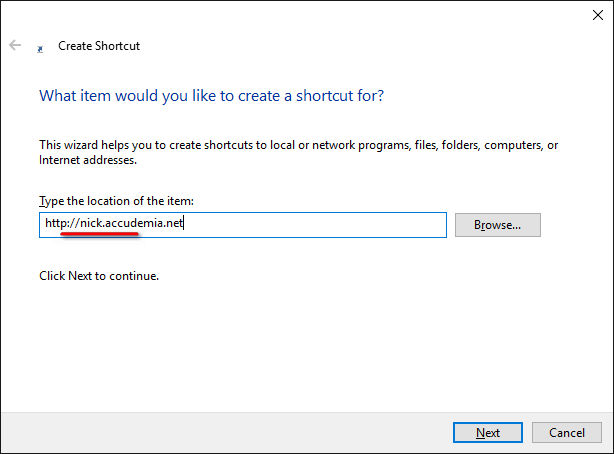
- Place your college's Accudemia website in the blank and click Next.
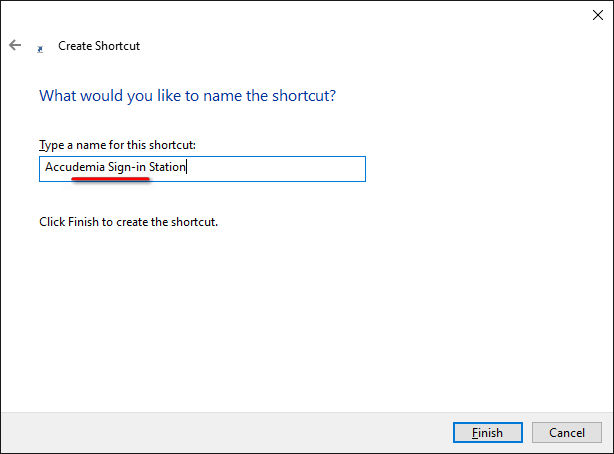
- Next give the Shortcut a name and click Finish.
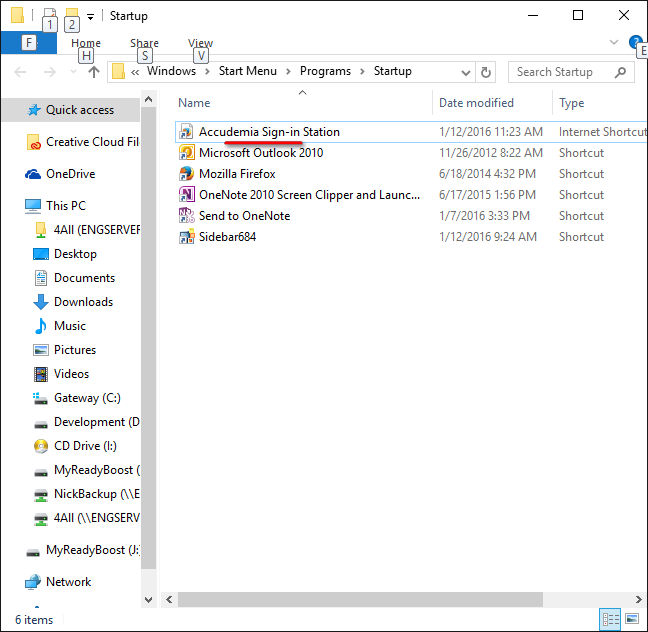
- Done! Now it should open your Accudemia website every time your computer starts up.Note: For this to work we need to have the Accudemia Sign-in Station setup on whatever application is your default web browser (this could be Internet Explorer (IE), Mozilla Firefox, Google Chrome, Apple Safari, etc.). The default browser is what opens by default on your computer when you click a web link. Notice in the image above my default browser is Mozilla Firefox because the link itself has an icon that looks like the "Firefox" circling the globe. IE as an example uses a blue lower case "e" icon, google chrome uses a somewhat primary-colored(red, green, blue, & yellow) circle icon, and Apple Safari uses a stopwatch icon, etc. I am not too sure what any other browsers icons look like because we recommend using one of the 4 most popular browsers mentioned above for Accudemia.
Related to page: /Private/TrustedMachine/List.aspx